Matplus EDA® · Usability and data analysis

Usability and data analysis with MMPDS in Matplus EDA®

The MMPDS database in Matplus EDA® is more than a lookup table. A built-in data warehouse lets you analyze, compare and select materials graphically, and the validated MMPDS reference data stays unchanged.

  • 2D and 3D visualization
  • Unit conversion
  • Open JSON format
  • CAE export
Usability and data analysis with the MMPDS database in Matplus EDA®

Analysis

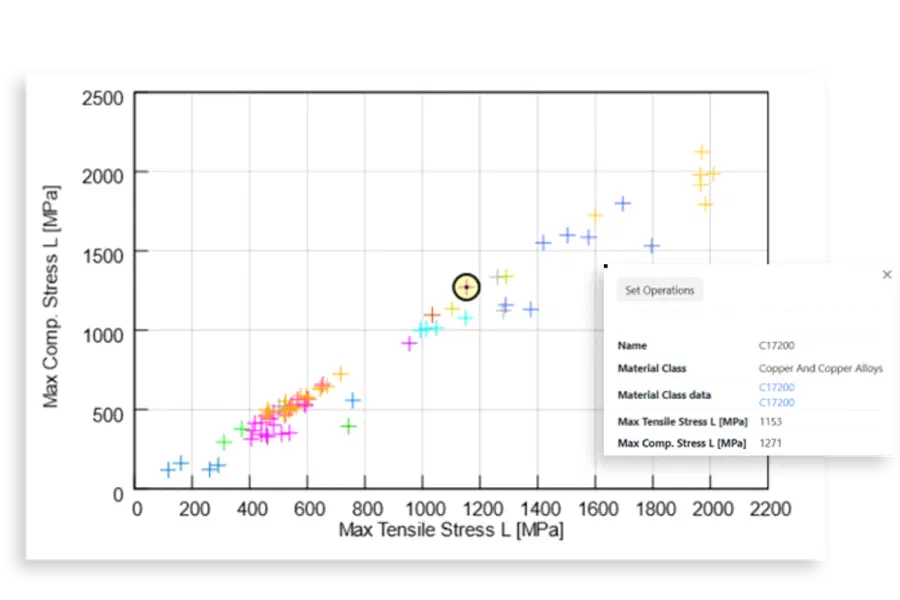
Visualize and compare MMPDS data

2D and 3D visualization

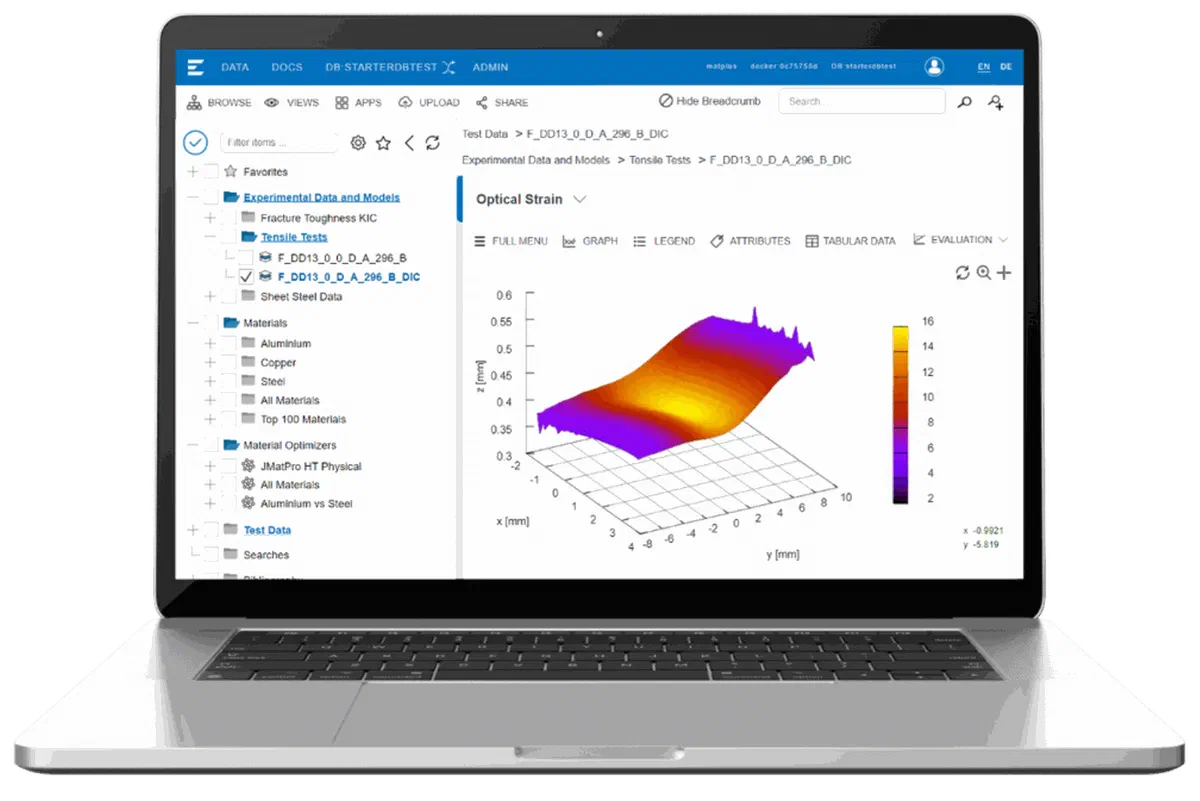
Matplus EDA® shows material properties as 2D and 3D graphics. Multi-dimensional data fields, such as flow curves, can be displayed directly.

Tabular comparison of alloys and tempers

Select several materials and compare them side by side in tables, or superimpose their curves. This lets you evaluate several alloys or heat treatment conditions in one view.

Filter and statistical evaluation

Filter, parameterize and evaluate data statistically. You can also integrate your own mathematical functions.

Matplus EDA® with the MMPDS database: stress-strain curve in a 3D view

Units and language

Work in your units and your language

Unit conversion with unit-neutral storage

Values are stored unit-neutrally and shown in the units your team works with. The underlying validated data is not changed.

Multilingual metadata and content

Matplus EDA® supports several languages at all levels, for metadata and for data content.

Free definition of views

You define different views on the data, for each user and each group. Everyone sees the properties that are relevant for their work.

Documentation

From analysis to documentation

Import and export

Data from different sources, e.g. xls, csv and JSON.

Report writing

Configurable templates in print quality.

Wiki system

Equations (MathJax), data integration and bibliographies.

Import and full-text indexing of files

E.g. PDF and Office, using Elasticsearch.

Extensibility in Python

With all scientific-technical Python libraries.

Open JSON format and traceability

All data is stored in a human-readable JSON format. If the software is no longer available, the data can still be read and is not lost. Versions and revisions keep changes transparent and traceable.

Workflow

Typical workflow

  1. Find

    Search and filter MMPDS materials.

  2. Compare

    Superimpose curves or compare values in a table.

  3. Evaluate

    Apply filters, statistics or your own functions.

  4. Document

    Create a report from a template or export the data, e.g. to CAE.

Design values

Allowables in MMPDS: A-, B- and S-basis

MMPDS design values are statistically based allowables, not typical values from a data sheet.

T99 · 95 %

A-basis

At least 99% of the population is expected to lie above the value, at 95% confidence.

T90 · 95 %

B-basis

At least 90% of the population is expected to lie above the value, at 95% confidence.

Specification

S-basis

The minimum value from the material specification.

For transport aircraft, 14 CFR § 25.613 requires 99%/95% values for single-load-path structure and 90%/95% values for redundant structure. MMPDS values are recognized by the FAA, the DoD and NASA within their stated limitations. Typical values from data sheets are not statistically based design values.

Data quality

Assessing data quality

Before you use a value, check each record:

  • Which type of value is it: typical, minimum or statistically based allowable?
  • Where does it come from, and which source, specification and product form does it refer to?
  • Is the designation cross-referenced to other standards?
  • Is the data maintained, and is a new edition reflected?
  • Can the data be passed on directly, e.g. exported to CAE?

Aerospace

Typical questions in aerospace

Which MMPDS values apply to this product form?

How do the lab, simulation and certification package stay linked?

How does the history remain continuously auditable?

Material modelling

From test data to CAE material cards

With Matplus EDA®, you build material models from test data.

  1. Take over test data

    Import the test data into Matplus EDA®.

  2. Evaluate

    E.g. visualize multi-dimensional data fields such as flow curves and CCT diagrams.

  3. Parameterize

    Parameterize constitutive material models.

  4. Generate the material card

    E.g. for Abaqus or LS-Dyna.

You can integrate your own mathematical functions without additional programming, and store and retrieve data in n-dimensional data fields.

Integration

Integration with CAD, PLM and ERP

Material selection

Material selection, integrated into Siemens NX and Catia. Engineers search materials with configurable searches, compare them graphically and assign them to components.

  • Siemens NX
  • Catia

Interfaces

Interfaces connect Matplus EDA® with your enterprise systems.

  • ERP
  • PLM
  • LIMS
  • CAE
  • MES

Consolidate and pass on

Data is consolidated, structured and maintained, then passed on to ERP, PLM, CAD and CAE.

  • xls
  • csv
  • JSON

MMPDS-26

What's new in MMPDS-26

New edition
  • Revised allowables for 2074-T8, 2050-T84, 7075-T76511 and 7140-T7351
  • New fatigue data for 15-5PH (H1025)
  • Ti-6Al-4V (stress-relieved, wire PA-DED) added in Volume II
The MMPDS data is provided in structured form for CAE/CAD and PLM systems and via APIs. The extended version with analysis functions, CAE/CAD integration and compliance support is available in Matplus EDA®.

FAQ

Frequently asked questions

Can Matplus EDA® run in the cloud or on premises?
Both are possible.
Can I export my data?
Yes. Data is stored in an open, human-readable JSON format and can be exported, so there is no vendor lock-in.
Which editions are available?
Starter, Professional and Enterprise. See the editions of Matplus EDA®.

Metallic Materials Properties Development and Standardization

More than Material Reference Data